Web developer · Quote → Invoice → Credit note

Keep a project quote, a milestone invoice, and a post-launch correction distinct.

Priya is a fictional independent web developer scoping a website rebuild for a fictional florist, Thistle & Bloom. The workflow moves from a proposed project quote to a milestone invoice covering build, accessibility, and deployment work, and a credit note after a feature is descoped following launch.

Example scenario: The person and business described on this page are fictional and demonstrate a possible InvoiceCraftly workflow. This is not a customer testimonial.
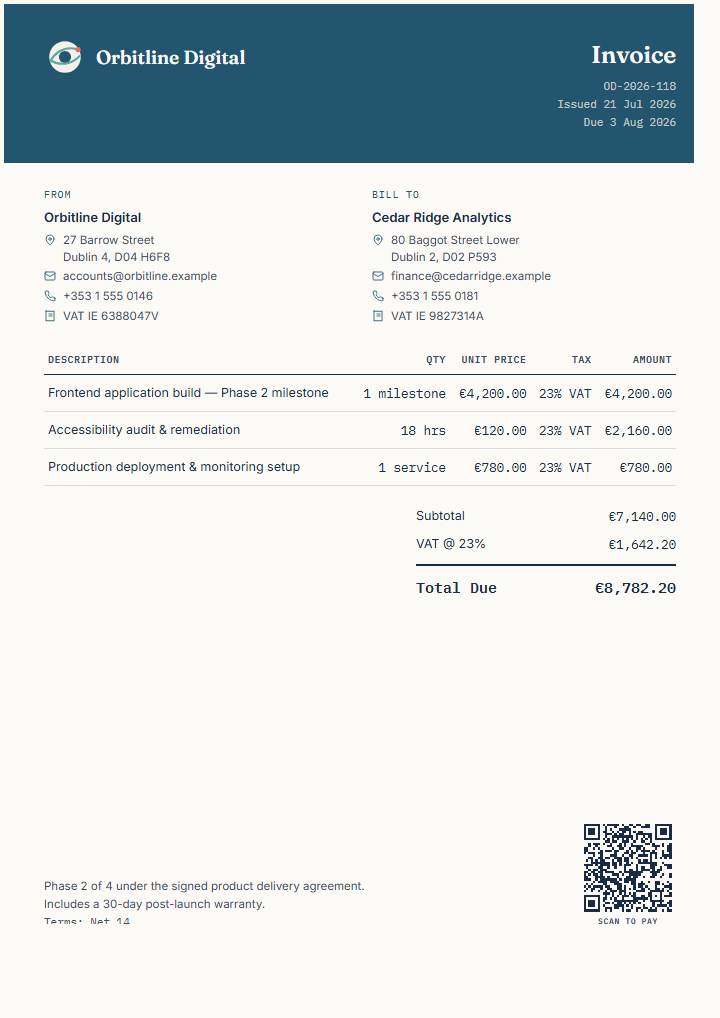
Finished fictional web developer invoice showing a milestone, accessibility remediation, and deployment lines
Illustrative InvoiceCraftly web developer export. Replace every field.
01Quote02Invoice03Credit note
Fictional business need

A site rebuild needs a proposed scope, a milestone bill, and a later correction.

Priya's fictional practice, Lantern Peak Web, has been asked to rebuild the ordering website for Thistle & Bloom, a fictional florist. A quote sets out the proposed pages, integrations, and timeline before work starts. Once the build is delivered, the invoice bills the completed milestone alongside accessibility remediation and deployment as separate lines. After launch, one requested feature is descoped following client review, and a credit note documents the reduction against the milestone invoice.

Stage 01

Quote the project scope

Use a quote to make proposed pages, integrations, and timing reviewable before work begins.

Create a quote

Example line items

Proposed scopeUnitExample amount
Website rebuild (5 pages)project€1,800
Online ordering integrationintegration€450
Content migration and delivery timelinetask€300

Make the proposal useful

  • List pages, features, and integrations separately rather than a single build fee.
  • State the delivery timeline, assumptions, content dependencies, and any revision limits.
  • Confirm hosting, domain, and third-party service costs are excluded unless stated otherwise.
  • Confirm the tax, currency, and business wording that applies before sharing the quote.
Stage 02

Invoice the delivered milestone

Bill the completed build, accessibility remediation, and deployment as separate lines.

View web developer template

Milestone billing example

Delivered workUnitExample amount
Website build deliverymilestone€1,800
Accessibility remediation (WCAG fixes)task€320
Deployment and hosting setupservice€150
Additional technical support3 hours€225

VAT is calculated on the invoice total according to the fictional issuer's own registration and rate.

Move from approval to billing

After the launch review in Priya's chosen process, she creates a separate invoice rather than editing the quote, keeping the original scope on record. She checks the client reference, delivered milestone, accessibility work, deployment line, and hourly support before sending.

Calculate your hourly rate before billing technical work →
Stage 03

Document a post-launch scope reduction

Use a credit note when a delivered milestone needs a connected correction after launch.

Create a credit note

Fictional correction

After client review, the custom booking calendar feature is descoped and removed from the delivered scope, reducing the earlier milestone charge by an illustrative €300. The credit note identifies the original invoice reference, describes the descoped feature, and shows the relevant reduction according to the issuer's own accounting and tax requirements.

Review before issuing

  • Reference the earlier milestone invoice clearly.
  • Explain the reason and the affected feature or amount.
  • Confirm whether amounts should be positive or negative for the recipient's process.
  • Record any refund separately and keep the payment record alongside the credit note.
Read the credit-note format guide →

InvoiceCraftly features used

  • Quote, invoice, and credit-note document types.
  • Web developer starting point, milestones, hourly lines, VAT, references, and terms.
  • Logo, accent colour, History on this device, duplicate workflow, and backups.
  • PDF, PNG, and SVG export after review.

What you remain in control of

  • Handle project approval, scope changes, accessibility testing, deployment, and payment collection using the process you choose.
  • Choose when to create or duplicate each document, how to deliver it, and how to record payment in the systems you use.
  • Confirm the tax, accessibility-compliance, and consumer requirements that apply before issuing documents.
  • Export a workspace backup when these documents are important to your records or portability.